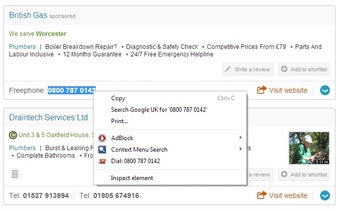
Simple Right Click to Dial for Chrome Context Menu
Right Click to Dial - SIP Dialer is a Chrome extension developed by Worcester Apps. This free add-on falls under the category of Browsers and the subcategory of Add-ons & Tools.
The main purpose of this extension is to enable users with SIP dialing programs to easily dial phone numbers directly from their Chrome browser. Once installed, it adds a link to the context menu (or right-click menu) of Chrome. Users can simply select the desired text, right-click, and choose the "Right Click to Dial" option. The extension will then communicate with the user's SIP software to initiate the call.
This extension is particularly useful for Gigaset Quicksync phone users. While the developer mentions that it is their first extension and welcomes any feedback, it is important to note that contacting the developer directly is not recommended.
Windows users will need to follow a two-step process to set up the extension. First, they need to download and extract the "Ian Sharp's" DialV4Beta1.zip file from a specific website. Then, they need to create a file called sip.reg and add specific lines of code to it. This will establish the necessary link between the Chrome extension and the Dialer.exe program in Windows 7.
Overall, Right Click to Dial - SIP Dialer offers a convenient solution for Chrome users who frequently make phone calls using SIP dialing programs. It streamlines the dialing process and enhances productivity. However, users should ensure they follow the provided instructions carefully to set up the extension correctly.